How to Find Clothes in a Picture: A Step-by-Step Guide (2026)
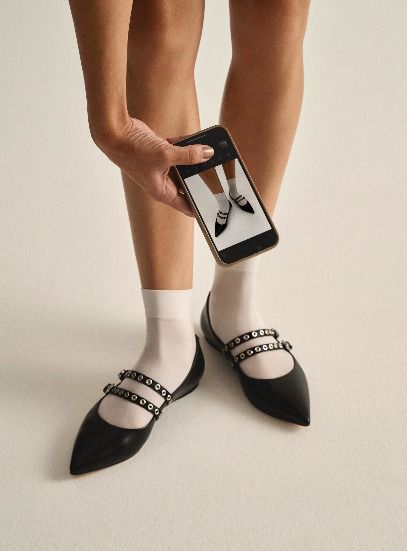
Knowing how to find clothes in a picture used to mean hours of scrolling through Google with vague keyword guesses. Today, AI-powered visual search has changed that completely — you upload an image, and the tool does the work. According to Forbes, generative AI and visual search are rapidly becoming the dominant discovery method in fashion retail, with more shoppers turning to image-based tools instead of text search every year. Whether you're working from a blurry TikTok screenshot, a Pinterest save, or a photo you snapped on the street, this guide covers every method — step by step.
Table of Contents
How Visual Search Actually Works
Step 1: Prepare Your Image Before You Search
Step 2: Choose the Right Tool for Your Search
Step 3: The Best Apps to Identify Clothes in Photos
Step 4: Refine Your Results With Text
Step 5: What to Do When the Item Is Sold Out
Step 6: When Apps Fail — Human Search Methods
FAQ
How Visual Search Actually Works
Before diving into tools, it helps to understand what happens when you upload a photo. Visual search AI doesn't "see" the way humans do — it breaks an image down into measurable features and compares them against a database of known products.
The core process:
Garment detection — the AI isolates the clothing item from the background
Feature extraction — it reads silhouette, color, texture, pattern, and cut
Vector matching — it compares those features against millions of indexed products
Results ranking — it surfaces the closest visual matches, ranked by similarity
Research published in Fashion Meets Computer Vision: A Survey on ArXiv confirms that modern AI models can reliably detect garment attributes and match them across large retail datasets — but accuracy depends heavily on image quality and how well the tool is trained on fashion-specific data.
This is why not all visual search tools perform equally. A general-purpose tool like Google is trained on everything; a fashion-specific tool is trained on clothing. The difference shows in the results.
Step 1: Prepare Your Image Before You Search
The single biggest factor in getting accurate results isn't the tool — it's the image. A poorly cropped, low-light, or cluttered photo will confuse even the best AI.
What makes a good search image
Crop tightly around the specific item you want to identify — exclude as much background as possible
Use the clearest version available — if you have multiple screenshots, pick the sharpest one
Avoid heavy filters — edited colors throw off fabric and tone detection
Try multiple angles if you have them — a front view and a detail shot often return different (better) results
Isolate one item at a time — searching a full outfit as one image works for outfit matching, but for exact item ID, crop to just the piece
Even the most advanced tools struggle with heavily filtered Instagram photos or grainy TikTok pauses. When image quality is out of your control, the tools in Step 4 can help compensate with text refinement.
Step 2: Choose the Right Tool for Your Search
Not every tool is built for the same job. Matching the right tool to your specific situation will save time and get better results.
Match your situation to a tool type
Your Situation | Best Tool Type |
|---|---|
You have a clear photo and want the exact item | Fashion-specific visual search app |
You want quick results and aren't picky about source | Google Lens |
You only know the vibe, not the item | Pinterest visual search |
The item is sold out and you want a resale version | Resale-integrated app or platform |
You have a blurry screenshot and need help describing it | AI description tool + text search |
Every app has failed | Reddit community search |
Step 3: The Best Apps to Identify Clothes in Photos
Copped — Best for Fashion-Specific Image Search
Copped is purpose-built for finding clothes in pictures — not a general image search tool that happens to work on fashion. It was created in 2025 by two clothing resellers who understood exactly what was missing from existing tools: resale results, mobile-native design, and a workflow that fits how people actually discover clothes today.
Key features:
Shortcut upload button — share screenshots directly from Instagram, TikTok, Safari, or your camera roll without saving first
Resale-first results — surfaces matches from Depop, Poshmark, Vinted, and eBay alongside retail
Collections + recent history — organize your finds and revisit previous searches without losing anything
Text + image refinement — add descriptors to narrow results when the image alone isn't enough
Queue mode — scan multiple items in a single session, useful for thrift hauls
Continuously updated through 2025–26 based on user feedback
Weaknesses: iOS only; dataset is expanding (improves with use)
Best for: Anyone who regularly discovers clothes through screenshots, social media, or thrift stores and wants fashion-specific results that include resale
Google Lens — Best Free Option for Quick Identification
Google Lens is the most accessible way to identify clothes in photos — it's free, built into Android and the Google app on iOS, and requires no account.
Key features:
Instant results from across the web
Lets you highlight a specific area of an image to isolate one item
Text refinement bar to add descriptors after the initial search
Weaknesses: Results skew heavily toward fast-fashion retailers (SHEIN, Temu, AliExpress); weak on vintage, niche, or resale items; no saved history or collections
Best for: Quick lookups of common, commercially available clothing items
Pinterest Visual Search — Best for Identifying a Style or Aesthetic
Pinterest's built-in visual search is less about finding the exact item and more about understanding the aesthetic it belongs to. As The Verge reports, Pinterest's AI visual search tools are leading the industry in fashion vibe-matching, helping users name and explore styles they can't easily put into words.
Key features:
Strong at identifying style categories (cottagecore, minimalist, Y2K, etc.)
Great for building moodboards and planning outfits
Links to similar saved content across Pinterest's database
Weaknesses: Rarely identifies the exact product or retailer; many pins are reposted without original source links
Best for: When you want to understand the style of what you're looking at before searching for the item itself
Lykdat — Simple Web-Based Image Search
Lykdat is a straightforward web tool focused on matching clothing images to mainstream retail inventory.
Key features:
Clean, simple upload interface
Works well on desktop
Covers a range of popular retail sources
Weaknesses: Web-only; limited resale or vintage coverage; not optimized for screenshots or mobile
Best for: Desktop users doing a quick retail lookup from a clear product image
ChatGPT AI Clothes Finder — Best for Describing What You See
The ChatGPT AI Clothes Finder is useful when you need help putting words to what you're looking at before searching elsewhere. Upload an image and it will describe the garment — silhouette, neckline, fabric type, era, aesthetic — in terms you can use to refine a visual or text-based search.
Key features:
Excellent at interpreting and describing garment details
Conversational — you can ask follow-up questions to narrow the description
Weaknesses: Results are text-only, not visual; linked products frequently return 404 errors; no resale support; web-only
Best for: Generating accurate terminology to use in a follow-up visual search, especially for unusual or hard-to-describe items
Step 4: Refine Your Results With Text
If your first search doesn't return accurate results, adding text descriptors alongside the image often makes a significant difference. Most visual search tools — including Copped, which combines image and text search for sharper fashion results, and Google Lens — support image-plus-text queries.
What to add as text refinement
Silhouette: A-line, bodycon, oversized, fitted, wrap
Fabric: satin, linen, mesh, knit, velvet, chiffon
Neckline or detail: cowl neck, halter, open back, corset
Era or aesthetic: 90s, Y2K, minimalist, vintage, cottagecore
Color accuracy: champagne (not white), forest green (not green), slate (not grey)
The more specific your description, the more the algorithm can compensate for a low-quality or ambiguous image. If you're unsure what vocabulary to use, upload the image to the ChatGPT AI Clothes Finder first to generate accurate terminology, then take that description back into a visual tool.
Step 5: What to Do When the Item Is Sold Out
Finding the exact item is only half the challenge. A growing share of clothes people discover online — viral TikTok fits, old Pinterest saves, archived runway pieces — are no longer available at retail. The Guardian reports that the secondhand fashion market is experiencing a significant surge in 2025, meaning more sold-out inventory than ever is now available on resale platforms.
Search resale platforms directly
Once you know what you're looking for — brand, garment type, color, approximate era — search these platforms manually or through an app:
Depop — best for vintage, Y2K, and independent sellers
Poshmark — wide range of brands and price points
Vinted — strong for European inventory and everyday secondhand
Use a resale-integrated visual search tool
Copped pulls results from resale marketplaces alongside retail, making it the most practical tool when the original item is gone. Instead of manually searching each platform, you get visual matches from resale and retail in a single search.
Search for dupes instead
If the original is truly unavailable, searching for a visual dupe is often more efficient than tracking down the exact piece. Most garment silhouettes are manufactured by a small number of factories — close matches exist more often than people expect, even for high-end or viral items.
Step 6: When Apps Fail — Human Search Methods
Visual search AI has clear limits. It struggles with heavily edited photos, very old or obscure garments, poor lighting, and items from small independent brands with no online retail footprint. When every app returns irrelevant results, human-assisted identification is often faster and more accurate.
Reddit — r/findfashion
The r/findfashion community is one of the most reliable resources for tracking down hard-to-identify clothing. Members are experienced at spotting brand signatures, silhouette details, and obscure labels that AI consistently misses. Post your image with as much context as you have — the era you think it's from, where you saw it, any visible details — and the community will usually identify it within hours.
Reverse image search via Google Images
For items that might appear in editorial, runway, or press coverage, a standard reverse image search on Google Images can surface original source articles or lookbooks that identify the brand or collection.
Brand-specific searches
If you already have a partial ID — a logo, a label detail, or a known retailer — search that brand's archive or contact their customer service. Many brands can identify past-season pieces by photo.
Dig Deeper
If you’re looking to find clothes from a picture, these guides go deeper into specific tools, methods, and use cases:
How to Find a Dress From a Picture or Screenshot (when the exact one is sold out)
Clothes Detector: Best Apps that Identify Clothes From A Photo (2026)
We're also on Medium.
FAQ
What is the best app to find clothes in a picture?
For most users, Copped is the most capable app for identifying clothes in photos because it combines fashion-tuned AI with resale platform results and a mobile-first upload flow. For quick, free lookups of common items, Google Lens is the fastest option.
How do I identify clothes in photos when the image is blurry?
Start by uploading the image to the ChatGPT AI Clothes Finder to generate a text description of the garment. Then take that description and combine it with the image in a visual search tool that supports text + image queries. If that still fails, post to r/findfashion — human pattern recognition outperforms AI on low-quality images.
Can I find outfit from image when only part of the outfit is visible?
Yes — crop as tightly as possible around the visible item and search for it individually. Trying to match a partial outfit as one image will confuse most tools. Once you identify each visible piece, you can reconstruct the full look.
Why does every app keep returning fast-fashion results?
General tools like Google Lens are trained on the broader web, which is dominated by fast-fashion retailers. Copped prioritises resale and independent sources over fast-fashion duplicates, which produces more accurate matches for unique, vintage, or non-mainstream pieces.
What if the exact item I'm looking for is sold out?
Switch to resale-first search. Copped surfaces resale matches from Depop, Poshmark, and Vinted alongside retail results, making it the most practical tool when the original item is no longer available. Searching for a visual dupe is often faster than tracking down the exact piece.
Does image quality really affect the results?
Significantly. Clear lighting, a tight crop, and minimal background clutter all improve AI accuracy. Even a sharper screenshot from a slightly different moment in the same video can return completely different — and better — results. When image quality is genuinely poor, add text descriptors to compensate.