Clothes Detector: Best Apps That Identify Clothes From a Photo (2026)
A clothes detector does one thing: it looks at an image and tells you what the clothing is — and ideally, where to buy it. But not all tools that claim to do this are actually built for fashion. Most are general image recognition engines that happen to recognise garments among thousands of other object categories, which is why results are often irrelevant, fast-fashion heavy, or completely off the mark. According to Ultralytics' analysis of AI in fashion retail, the difference between general-purpose and fashion-tuned detection models is substantial — especially for niche garments, resale inventory, and screenshot-based searches. This guide ranks the best clothes detector apps available in 2025 and explains exactly what each one is good for.
Table of Contents
How a Clothes Detector App Works
What to Look for in an App That Identifies Clothes
Comparison Table — Best Clothes Detector Apps (2025)
Copped — Best Clothes Detector for iPhone
Google Lens — Best Free Clothes Detector
Pinterest — Best for Outfit Identification by Aesthetic
Lykdat — Simple Web-Based Clothes Detector
ChatGPT AI Clothes Finder — Best for Detailed Garment Identification
Which Clothes Detector App Should You Use?
FAQ
Dig Deeper
If you’re looking to find clothes from a picture, these guides go deeper into specific tools, methods, and use cases:
We're also on Medium.
How a Clothes Detector App Works
Every clothes detector runs on computer vision AI — but the quality of what gets detected depends entirely on what the model was trained on. A general image recognition model sees a shirt the same way it sees a chair: as an object in a category. A fashion-specific model sees fabric weight, drape, silhouette type, neckline construction, and color undertone — the details that actually matter when you're trying to identify or buy a garment.
The detection pipeline for a clothes-specific tool typically involves:
Segmentation — isolating the garment region from the background and other objects
Classification — determining the garment type (dress, jacket, trousers, etc.)
Attribute extraction — reading visual features like pattern, texture, color, and cut
Catalogue matching — comparing extracted features against indexed product databases to return shoppable results
Where tools diverge is in step four: what they index. A general tool indexes the open web — which skews toward high-SEO fast-fashion retailers. A fashion-specific outfit identifier indexes curated retail and, in the best cases, resale marketplaces too.
What to Look for in an App That Identifies Clothes
Given the transactional nature of most clothes detector searches — people want to find and buy something specific — the tool's ability to return purchasable results matters as much as its detection accuracy.
Key criteria to evaluate:
Detection accuracy on fashion items — does it distinguish between a satin slip and a cotton midi, or does it just return "dress"?
Resale platform coverage — the best finds, especially for sold-out or vintage items, live on Depop, Poshmark, and Vinted, not just retail sites
Screenshot handling — most outfit discovery happens on social media; an app that struggles with cropped or low-resolution screenshots is limited in practice
Text + image refinement — the ability to add descriptors alongside an image significantly improves results for ambiguous photos
Mobile-native design — a clothes detector built for desktop doesn't fit the mobile-first way people discover fashion today
Organization tools — collections and search history prevent good finds from disappearing
Comparison Table — Best Clothes Detector Apps (2025)
App | Best For | Detection Accuracy | Resale Support | Screenshot Upload | Organization | Platform |
|---|---|---|---|---|---|---|
Fashion-first detection, resale + retail | Excellent (fashion-tuned) | Yes — Depop, Poshmark, Vinted, eBay | Yes — shortcut from any app | Collections + history | iOS | |
Fast, free everyday identification | Good for common items | No | Yes | None | iOS / Android | |
Aesthetic and style identification | Strong for style categories | No | Yes | Boards | iOS / Android / Web | |
Simple desktop retail matching | Moderate | No | Limited | None | Web | |
Detailed garment description + terminology | Variable (text-only output) | No | Yes | None | Web |
Copped — Best Clothes Detector for iPhone
iOS · Fashion-tuned AI · Resale-first · Screenshot-native
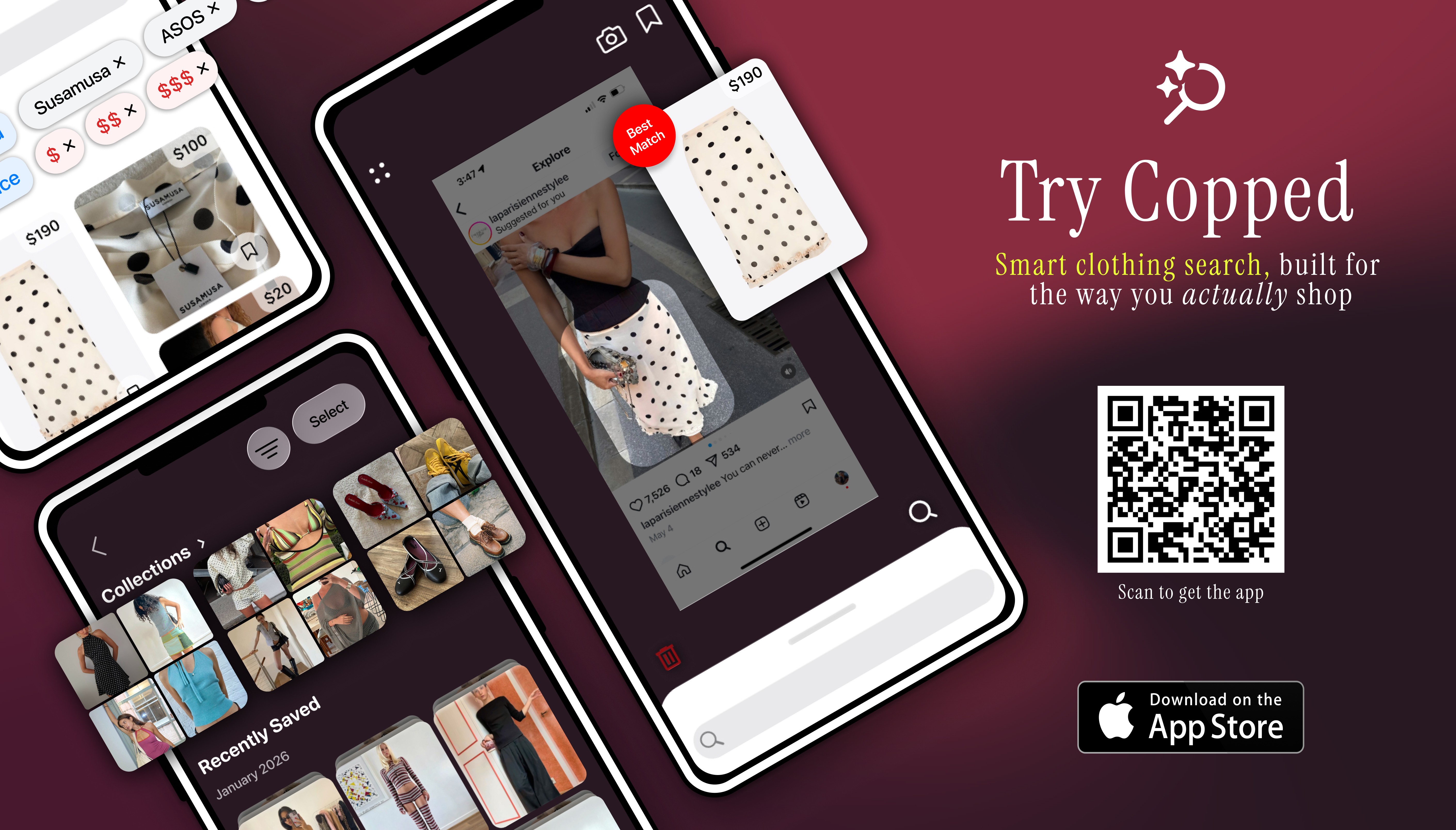
Copped is a clothes detector app built around the gap that general tools consistently leave open: resale inventory, screenshot-native upload, and a mobile experience that fits how people actually discover clothing in 2025. Built by two clothing resellers in 2025, it was designed by people who use these tools daily — which shows in the feature set.
What makes it the strongest outfit identifier for iPhone
Shortcut upload button — share screenshots directly from Instagram, TikTok, Safari, or your camera roll without saving them first, keeping your phone organized
Resale-first results — surfaces matches from Depop, Poshmark, Vinted, and eBay alongside retail, making sold-out items findable
Fashion-tuned AI — trained on garment-specific attributes rather than general web imagery, which means better detection on niche silhouettes, fabrics, and styles
Collections + recent history — organize detected items into folders and revisit previous searches without starting over
Text + image refinement — pair an image with descriptors like "wide-leg trouser, heavy linen" to sharpen detection on ambiguous photos
Queue mode — scan multiple items in a single session, built for thrift hauls and bulk discovery
Continuously updated through 2025–26 based on real user behavior
Weaknesses
iOS only — Android users will need to use an alternative in the meantime
Marketplace coverage expanding — improves as the dataset scales with use
Best for: iPhone users who regularly discover clothes through screenshots, social media, or thrift stores and need a clothes detector that returns both retail and resale results.
Google Lens — Best Free Clothes Detector
iOS / Android · Free · General-purpose
Google Lens is the most widely available clothes detector on the market — built into Android natively and accessible through the Google app on iOS. It requires no dedicated download and returns results instantly. For commonly sold, mainstream clothing items, it performs reliably.
Strengths
Instant results, no setup or account needed
Works across iOS and Android
Lets you crop to a specific item within an image for more accurate detection
Supports text refinement after the initial scan
Weaknesses
Results skew heavily toward fast-fashion retailers — SHEIN, Temu, and similar sites dominate
Weak detection on vintage, archival, independent, or resale-only items
No saved history, collections, or organization tools
Not trained specifically on fashion — treats clothing as one category among many
Best for: Fast, free identification of widely sold mainstream items when resale results and organization tools aren't a priority.
Pinterest — Best for Outfit Identification by Aesthetic
iOS / Android / Web · Free · Inspiration-first
Pinterest's visual search functions differently from a standard clothes detector — rather than returning shoppable product links, it identifies the aesthetic or style category of an image and surfaces similar-looking content. It's most useful when you want to understand the vibe of what you're looking at before moving to a purchase-focused tool. As The Verge reports, Pinterest continues to lead the industry in fashion aesthetic recognition and vibe-matching.
Strengths
Strong at classifying style aesthetics — cottagecore, quiet luxury, Y2K, minimalist, etc.
Good for naming a look before you can describe it in words
Moodboard tools make it useful for outfit planning
Weaknesses
Rarely identifies the exact garment or provides a direct purchase link
Many results are reposts with no original source
Not designed for direct purchase discovery
Best for: Identifying the style or aesthetic of a garment as a first step before running a more targeted clothes detector search.
Lykdat — Simple Web-Based Clothes Detector
Web only · Retail-focused · Desktop-friendly
Lykdat is a lightweight, no-account web tool that matches uploaded clothing images against mainstream retail inventory. It has a clean interface and works well on desktop for straightforward retail lookups.
Strengths
No account required — upload and search immediately
Simple, uncluttered interface
Covers a broad range of retail sources
Weaknesses
Web-only — no mobile app
No resale or vintage platform coverage
Not optimized for screenshots or mobile workflows
Limited accuracy for niche, editorial, or non-mainstream garments
Best for: Desktop users needing a quick, no-friction retail match from a clear, well-lit product image.
ChatGPT AI Clothes Finder — Best for Detailed Garment Identification
Web only · Conversational AI · Description-focused
The ChatGPT AI Clothes Finder is the strongest tool on this list for describing what a garment is — silhouette, fabric, neckline, era, and aesthetic. It doesn't return visual product matches, but the terminology it generates is often exactly what you need to run a more accurate search in a dedicated clothes detector app.
Strengths
High accuracy for interpreting and describing garment details from photos
Conversational — you can ask follow-up questions to refine the description
Useful fallback when visual tools return irrelevant results
Weaknesses
Text-only output — no visual product matches or shoppable links
Linked products frequently return 404 errors
No resale support
Web-only — not suited for mobile-first discovery workflows
Best for: Generating precise garment terminology from a photo before running a follow-up search in a visual clothes detector — especially for unusual, vintage, or hard-to-describe items.
Which Clothes Detector App Should You Use?
The right choice depends on your specific situation and what you need from the detection result:
You want to find and buy a specific item from a screenshot or social media post → Copped is the clothes detector app built for exactly this workflow — screenshot upload, fashion-tuned AI, and resale results in one place
You want a fast, free identification of a common item → Google Lens for instant results with no setup
You know the vibe but not the item name → Pinterest to identify the aesthetic before searching elsewhere
You need search vocabulary for an unusual or vintage piece → ChatGPT AI Clothes Finder to generate terminology, then run a follow-up visual search
You're on desktop and want a simple retail lookup → Lykdat for a no-fuss, no-account retail match
For most iPhone shoppers with a transactional goal — finding something to buy — Copped delivers the most complete clothes detection experience available, covering resale and retail from a single screenshot-first interface. As The Guardian reports, secondhand fashion inventory is surging in 2025 — making resale-integrated detection not just a nice-to-have, but the difference between finding what you're looking for and coming up empty.
FAQ
What is the best clothes detector app in 2025?
For iPhone users, Copped is the most capable clothes detector available — combining fashion-tuned AI with resale platform results, a screenshot-native upload flow, and built-in organization tools. For free, fast identification of common items, Google Lens is the best no-setup option.
Is there an app that identifies clothes from a photo?
Yes — several. Copped identifies clothes from photos and returns shoppable results from both retail and resale, making it the most purchase-ready option. Google Lens and Lykdat also identify clothes from images, though with retail-only results and no resale coverage.
Can a clothes detector app find sold-out items?
Only if it indexes resale platforms. Most tools return retail-only results, meaning sold-out items simply don't appear. Copped searches Depop, Poshmark, Vinted, and eBay alongside retail, giving sold-out, vintage, and discontinued items a realistic chance of surfacing.
What is an outfit identifier?
An outfit identifier analyzes a full look — not just a single item — and identifies each garment component separately: outerwear, top, bottom, shoes, and accessories. Copped supports full outfit identification from a single photo, making it useful for recreating complete looks from TikTok or street style images, not just tracking down individual pieces.
Why does my clothes detector return the wrong results?
The most common causes are image quality and tool choice. Low-resolution, heavily filtered, or cluttered images make garment segmentation harder for any AI model. Switching to a fashion-specific tool, cropping tightly around the item, and adding text descriptors alongside the image will all improve accuracy. If visual detection keeps failing, upload the image to the ChatGPT AI Clothes Finder to generate precise garment terminology, then use that in a follow-up search.
Does a clothes detector work with Instagram or TikTok screenshots?
Most tools accept screenshot uploads, but the experience varies. Copped's shortcut upload button lets you send screenshots directly from Instagram or TikTok without saving them to your camera roll — the most friction-free screenshot-to-detection flow currently available on iPhone.