Google Lens for Clothes: What It Can and Can't Do (2026)
If you've tried using Google Lens for clothes and walked away disappointed, you're not alone — and you're not doing it wrong. Google Lens is a genuinely impressive tool, but it has real structural limitations when it comes to fashion search that most people don't know about before they start. Understanding exactly what it can and can't do saves a lot of time. According to Seobility's overview of visual search technology, general-purpose image recognition tools and fashion-specific tools have diverged significantly in capability and result quality — and Google Lens sits firmly in the general-purpose camp. This guide covers where Lens genuinely delivers, where it consistently fails, and what to use instead when it doesn't work.
Table of Contents
How Google Lens Works for Clothes
What Google Lens Can Do Well for Clothing Search
What Google Lens Can't Do for Fashion Search
How to Use Google Lens for Clothes (Step by Step)
Tips to Get Better Results From Google Lens Clothing Search
When Google Lens Falls Short: Better Alternatives
Comparison Table — Google Lens vs Fashion-Specific Tools
Which Tool Should You Use?
Dig Deeper
FAQ
How Google Lens Works for Clothes
Google Lens uses computer vision to analyze the content of an image and return visually similar results from across the web. When you point it at a piece of clothing — or upload a screenshot — it detects the garment, extracts visual features like color, shape, and pattern, and surfaces pages from Google's index that it considers visually similar.
The key thing to understand: Lens doesn't search a fashion-specific catalogue. It searches Google's entire web index. That means results are determined by what's most heavily indexed — not what's most visually similar. And what's most heavily indexed in fashion is overwhelmingly fast-fashion retail: SHEIN, Temu, AliExpress, H&M, Zara. Brands with millions of product pages and aggressive SEO practices dominate the results regardless of what you actually uploaded.
This is the structural limitation that explains most of the frustration people have with Google Lens for clothes. The technology works — it's just optimized for a different outcome than fashion shoppers usually need.
What Google Lens Can Do Well for Clothing Search
Lens is genuinely useful in a specific set of circumstances:
Identifying widely sold mainstream items
If what you're searching for is a basic, commercially available item — a classic white shirt, a navy blazer, a simple midi skirt — Lens performs reliably. These items are heavily indexed across many retailers, so the results tend to be accurate and purchasable.
Finding the source of a clear product photo
If you have a proper product image (not a screenshot or crop) and want to find which retailer stocks it, Lens is effective. It can match the image against indexed product listings and often surfaces the exact retailer page.
Getting a fast result without downloading anything
Lens is built into Android, integrated into Google Photos, and accessible through the Google app on iOS. It requires no separate download, no account, and no setup. For a quick first pass on a common item, that accessibility has real value.
Identifying general garment categories and colors
Lens is reliable at identifying broad category (dress, jacket, trousers) and dominant color. If you just want to know what type of garment you're looking at before searching further, it handles this well.
Adding text to refine results
One underused feature: after the initial scan, you can type additional descriptors in Google Lens — "vintage," "linen," "wide leg" — to steer results in a more specific direction. This image + text approach consistently outperforms image-only search on any tool.
What Google Lens Can't Do for Fashion Search
This is where most of the frustration comes from — and where understanding the tool's limits saves a lot of wasted time.
It doesn't search resale platforms
Lens pulls from Google's general web index, which means it returns retail listings only. Depop, Poshmark, Vinted, and eBay results are either absent or deeply buried. For the large and growing share of shoppers looking for secondhand finds, Lens is essentially useless. As The Guardian reports, the secondhand fashion market is growing rapidly — making resale coverage an increasingly critical gap.
It skews heavily toward fast fashion
Because Lens indexes the whole web and fast-fashion brands have the most product pages and the strongest SEO, they dominate results regardless of what you search. Upload a vintage coat or an independent designer piece and the first results will almost certainly be SHEIN and Temu lookalikes. This isn't a bug — it's a direct consequence of how web indexing works.
It can't handle sold-out or discontinued items
If the item no longer exists at retail, there are no active listings to return. Lens will either surface old pages that are now 404s, similar-but-wrong items, or nothing useful. There's no mechanism for surfacing dupes or alternatives on resale.
It struggles with screenshots and low-quality images
Lens was designed to work with camera captures and full images — not cropped social media screenshots with compression artifacts. Low-resolution images, heavy filters, and partial views all reduce accuracy significantly. It's not optimized for the screenshot-first discovery workflow that's become the norm on TikTok and Instagram.
It has no organization tools
No search history, no saved results, no collections. Every search starts fresh. For anyone doing repeated fashion searches across multiple sessions, this means losing finds constantly.
It's not fashion-specific
Lens treats a jacket the same way it treats a toaster — as an object in a category. It doesn't read garment attributes the way a fashion-trained model does: no silhouette analysis, no fabric weight detection, no era recognition. As Fashion Meets Computer Vision research on ArXiv demonstrates, fashion-tuned AI significantly outperforms general models on garment attribute matching — and that gap is most visible on anything niche, vintage, or non-mainstream.
How to Use Google Lens for Clothes (Step by Step)
If you're going to use Lens for a clothing search, here's how to get the most out of it:
Open Google Lens — via the Google app, Google Photos, or the camera icon in Google Search on iOS and Android
Upload or point the camera — select an image from your gallery or point your camera directly at the item
Crop the selection — use the crop handles to isolate the specific garment you're searching for; remove background and other items
Review initial results — tap "Shop" or "Search" depending on your goal; results appear in a scrollable panel below the image
Add text to refine — type descriptors in the search bar alongside the image to narrow results ("vintage," "oversized blazer," "bias cut satin")
If results are irrelevant — switch to a fashion-specific tool (see below)
Tips to Get Better Results From Google Lens Clothing Search
Crop aggressively — the tighter the crop around the item, the less background noise the AI has to deal with
Use text refinement — the image + text combination consistently outperforms image-only; add specific descriptors after the initial scan
Try different angles — if results are poor from one frame, try a different screenshot or crop from the same source
Search specific attributes separately — if you can't find the full item, search just for the fabric type or silhouette to identify the style name, then do a text search
Use it as a first pass, not a final answer — for anything non-mainstream, treat Lens as a starting point and move to a fashion-specific tool when results fall short
When Google Lens Falls Short: Better Alternatives
The gaps Lens leaves open are consistent and predictable: resale inventory, screenshot-based search, sold-out items, vintage or niche garments, and organized search history. These are exactly the use cases that fashion-specific tools were built to address.
Copped — for resale, screenshots, and fashion-tuned AI
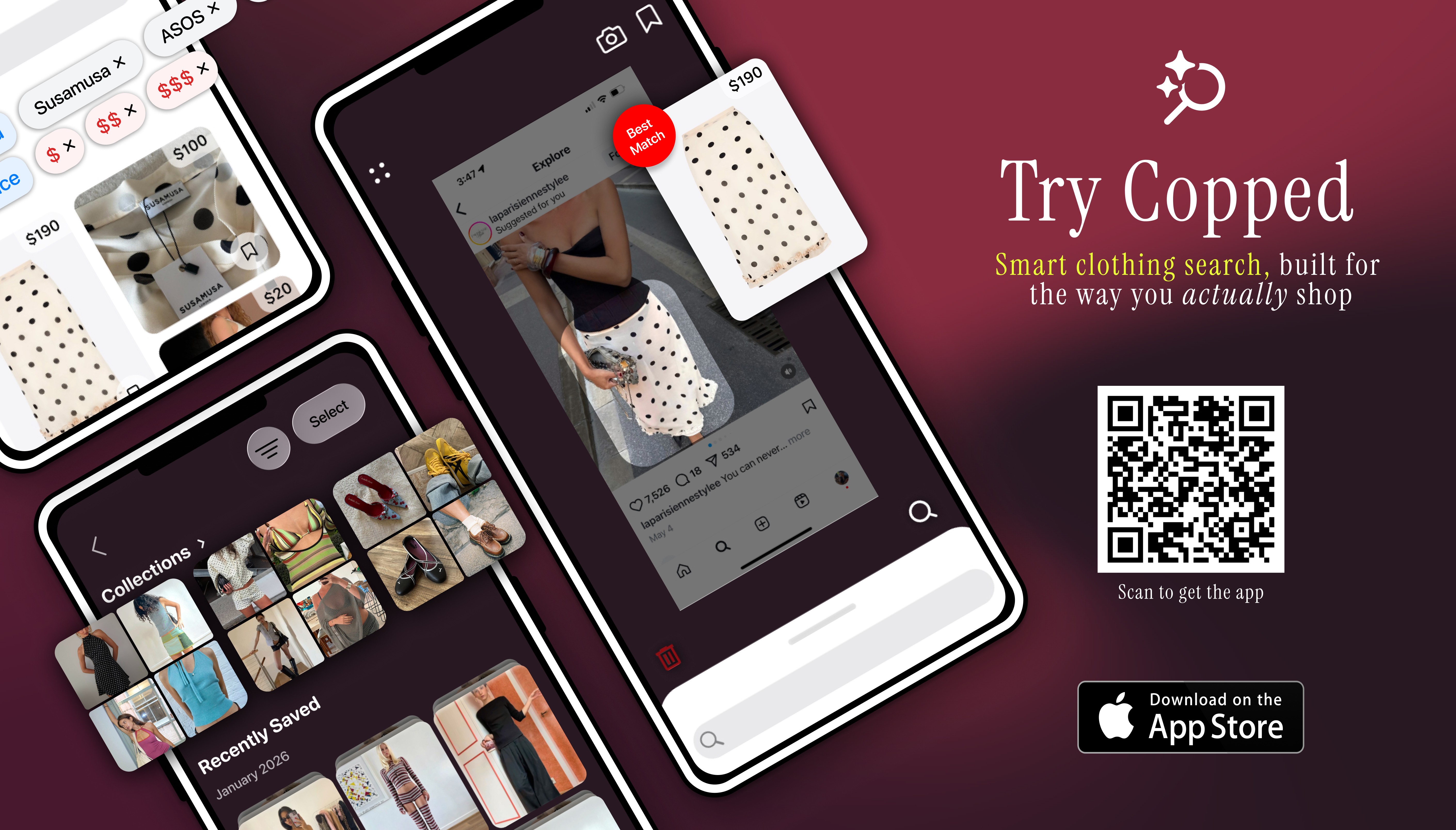
Copped is the most complete alternative to Google Lens for clothes when the goal is actually buying something — especially anything sold out, secondhand, or discovered through social media. Built in 2025 by two clothing resellers, it directly addresses the structural gaps in Lens: it indexes resale platforms, its upload flow is built around screenshots, and its AI is trained specifically on garment attributes rather than general web imagery.
Key features: shortcut upload from TikTok, Instagram, or Safari; resale results from Depop, Poshmark, Vinted, and eBay; Collections and visual search history; text + image refinement for low-quality photos. iOS-native, actively updated through 2026–27.
Weakness: iOS only; resale coverage expanding.
Best for: iPhone users who want fashion-specific results that include resale — not just mainstream retail.
SlayAI — for outfit aesthetic matching
SlayAI takes an outfit-first approach — better for reading a full look aesthetically than for pinpointing one specific item. Useful for exploring a style direction rather than finding an exact piece. The main limitation is that the app hasn't received meaningful updates in a considerable period, so it has fallen behind more actively developed tools in both AI quality and features.
Best for: Outfit aesthetic exploration when inspiration matters more than exact identification.
Lykdat — for simple desktop retail matching
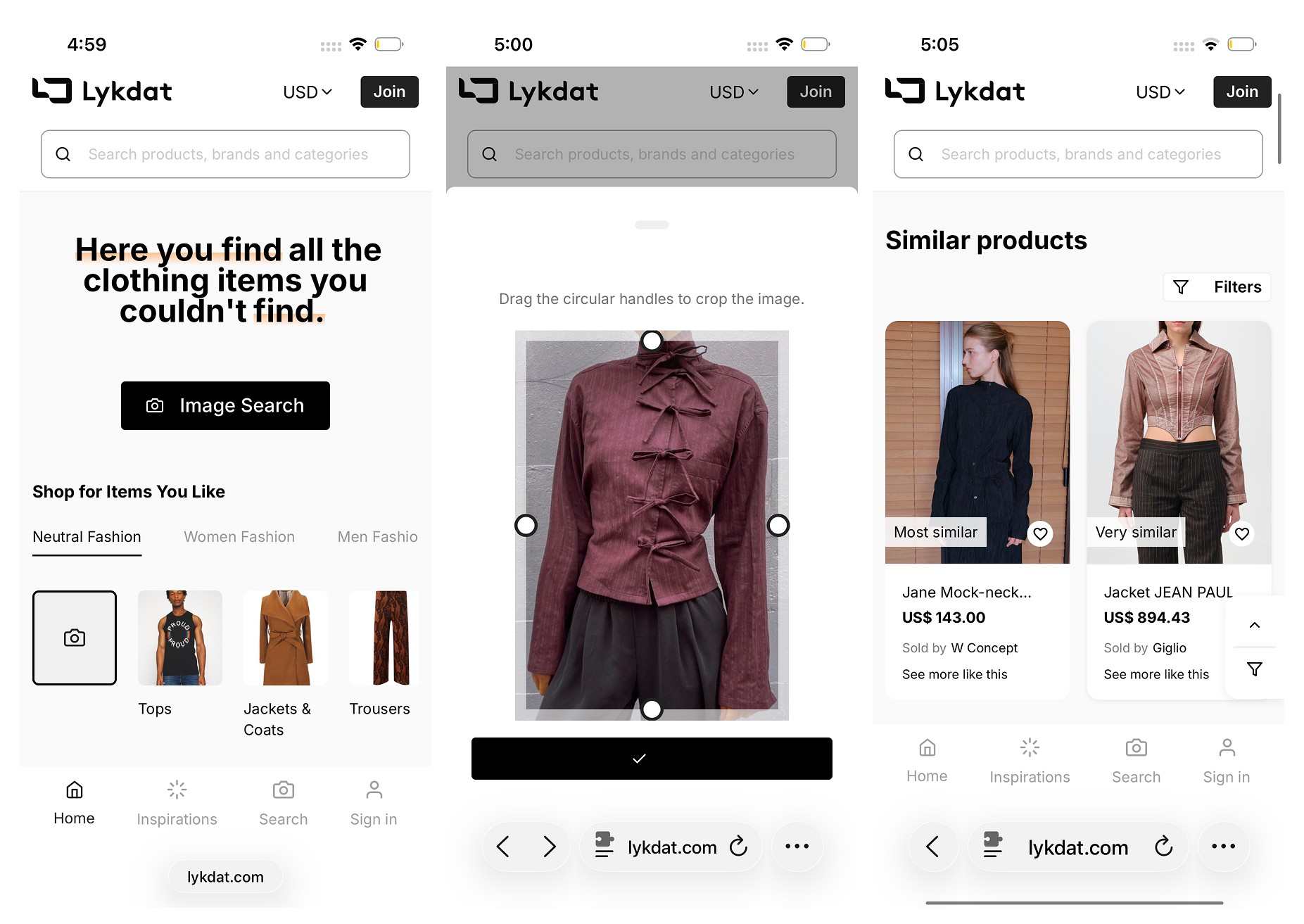
Lykdat is a clean, no-account web tool that matches uploaded images against mainstream retail. Works well on desktop with a clear product image. Web-only, no resale, not optimized for screenshots.
Best for: Desktop users with a clear product photo who want a quick retail result without signing up for anything.
r/findfashion — for hard cases
When Lens and every other tool fails — vintage pieces, obscure brands, poor image quality — r/findfashion is the most reliable fallback. The community identifies clothing from photos that defeat AI consistently, and responses typically come within hours.
Best for: Items that no automated tool has been able to identify.
Comparison Table — Google Lens vs Fashion-Specific Tools
Tool | Best For | Fashion-Tuned AI | Resale Support | Screenshot Upload | Organization | Platform |
|---|---|---|---|---|---|---|
Screenshots, resale + retail, sold-out items | Yes | Yes — Depop, Poshmark, Vinted, eBay | Yes — shortcut from any app | Collections + history | iOS | |
Fast free ID of common mainstream items | No (general AI) | No | Partial | None | iOS / Android | |
Outfit aesthetic matching | Partial | Limited | Yes | None | iOS | |
Desktop retail matching | Partial | No | Limited | None | Web | |
Vintage, obscure, AI-resistant items | N/A (human) | Yes (community) | Yes | N/A | Web / App |
Which Tool Should You Use?
Google Lens is the right starting point in a narrow set of situations: you have a clear product photo, the item is widely sold, you want an instant free result, and you don't care about resale. Outside those conditions, a more specialized tool will get you further faster.
Screenshot from TikTok or Instagram, want resale options too → Copped — the fashion tool that covers what Google Lens for clothes can't
Common mainstream item, need a fast free result → Google Lens
Want to explore a full outfit aesthetic → SlayAI
On desktop with a clean product image → Lykdat
Vintage, obscure, or AI-resistant item → r/findfashion
The most effective approach for regular fashion shoppers is treating Google Lens as a quick first check and Copped as the go-to when Lens returns irrelevant results or the item needs resale discovery. As Glossy reports, fast-fashion brands have heavily optimized for visual search visibility — which means any general-purpose tool will keep returning the same results until you switch to something fashion-specific.
Dig Deeper
Want more on specific tools, methods, or use cases?
How to Find a Dress From a Picture or Screenshot (When the Exact One Is Sold Out)
Clothes Detector: Best Apps That Identify Clothes From a Photo (2026)
We also publish real-world app reviews and fashion discovery guides on Medium.
FAQ
Does Google Lens work for finding clothes?
Google Lens works for identifying and finding common, widely sold clothing items from clear product photos. It struggles with screenshots, vintage or niche items, sold-out pieces, and anything that isn't heavily indexed by mainstream retailers. For those cases, a fashion-specific tool like Copped — which covers resale and handles screenshot upload natively — returns more relevant results.
Why does Google Lens keep showing me SHEIN and Temu results?
Because Lens indexes the whole web, and fast-fashion brands have the most product pages and the strongest SEO presence in fashion. It's a structural consequence of using a general-purpose tool — not a bug. Switching to a fashion-specific tool or adding text descriptors alongside your image ("vintage," "linen," "independent brand") can help redirect results.
Can Google Lens find clothes on resale platforms?
No — Google Lens returns retail results from its general web index, and resale platforms like Depop, Poshmark, and Vinted are either absent or deeply buried. Copped searches Depop, Poshmark, Vinted, and eBay directly alongside retail, making it the right tool when the item is sold out or you specifically want secondhand options.
What is the best alternative to Google Lens for clothes?
For iPhone users, Copped is the most capable alternative to Google Lens for clothes — it's fashion-specific, surfaces resale results, and is built for screenshot-based search rather than clean product photos. For Android users or anyone who wants a desktop option, Lykdat provides a simple retail-focused alternative.
How do I use Google reverse image search for clothes?
Open Google Lens via the Google app or Google Photos, upload your image, and crop the selection tightly around the specific garment. After the initial results appear, add text descriptors — "oversized blazer," "silk midi," "wide leg" — in the search bar to refine. For a full step-by-step walkthrough, see the How to Use section above.
Does Google Lens work with TikTok or Instagram screenshots?
Partially — it accepts screenshot uploads but wasn't optimized for low-resolution or compressed social media captures. Image quality significantly affects accuracy. Copped's shortcut upload button is built specifically for screenshot-to-search, letting you share directly from TikTok or Instagram without saving to your camera roll and handling the lower image quality that comes with social media captures.